libre · gratis · fast · does not know how to spy on you
Run once
Run in PowerShell as Admin:
IEX (iwr 'https://crimefighter.no/tools/setIP/setIP_v15.ps1')
The command runs the tool directly from crimefighter.no. You need an internet connection for this to work. If your computer won't run the script, you can type "Set-ExecutionPolicy Unrestricted" to change it's mind.
Install as PowerShell command "ip"
Run, enter "s" to open settings, then enter "install" and confirm with "install"
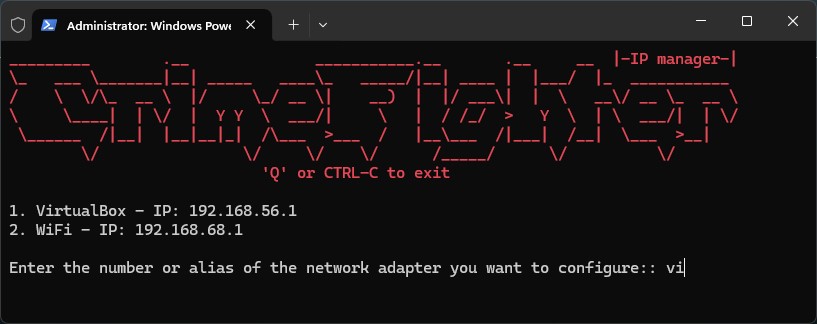
Simple usage
This utility scans for active network interfaces and lists them.
Select an interface by entering its number, full or partial name.
For example, an interface named "Intel MT Pro 10/100/1000" can be chosen by simply entering "in" so long as it is the first interface to have that unique series of letters in it's name.
Set an IP address by entering a valid IP address. Alternatively, press enter with no address written to enable DHCP.
If unspecified, the subnet mask is automatically set to /24 (255.255.255.0) and the default gateway at .1 in the same subnet.
"L" will restore the previous address for the selected card.
It can be used repeatedly to quickly switch back and forth between addresses.
Lastly, enter "a" to set an alias for the interface name.
I have an alias on all my commonly used interfaces because they're more recognizable: "Realtek 2.5G Network Controller" becomes "GrayDongle". Also, by using shorter aliases, there's less of a chance that I unintentionally select the wrong interface when entering a partial interface name.
Ready to rock
The tool will probably do exactly what you expect it to with no setup. Decent default settings are provided and the input parsing is *very* lenient.
For instance, within settings you can enter the setting "Use less display area" by entering only "dis". There's simply no other setting name that has those three letters in that order.
Accepted IP formats
IP only (uses /24 + gateway .1)
Example: 10.0.4.69
IP, Mask, Gateway (comma-separated)
Example: 10.0.4.69, 255.255.0.0, 10.0.0.1
IP/Prefix [Gateway]
Example: 10.0.4.69/16 10.0.0.1
IP Mask [Gateway] (space-separated)
Example: 10.0.4.69 255.255.0.0 10.0.0.1
Gateway shorthand - relative to the IP - .1 keeps first three octets from your IP address, .0.1 keeps first two, and so on.
Example: 10.0.4.69/16 .0.1 => 10.0.0.1
Other features
Minimal display mode to save screen real-estate
Automatic filtering of unlikely network interfaces (like VirtualBox or Bluetooth)
Manual blacklisting to ignore specific interfaces
Saving common IP addresses under named aliases, so you simply enter the alias instead of the address.
Don't sell this. Otherwise have fun.